Action Upon Determining There is Restricted Visibility
Introduction
The COLREGS require that several actions be taken if you find yourself in or near an area of restricted visibility.
Rule 19(b) - Reduce Speed
When you find yourself facing restricted visibility you are required to use "a safe speed adapted to the prevailing circumstances and conditions". Generally this means you have to slow the boat, perhaps to just a few knots. A good rule of thumb is to set this speed at a level where you can stop the boat in half the visual range. You may determine a safe speed is even lower than that, to give you, the helmsman, and others a bit of a "reaction buffer" if you do have to stop the boat.
Rule 19 (c) - Reassess Compliance with the "Rules of Section I of this Part"
This rule contains fancy COLREGS legalese that means: "Go over rules in Section I - Conduct of Vessels in Any Condition of Visibility". In particular:
Rule 5 - Lookout Assign at least one lookout to go out on the outer deck and take the headphones off to listen for signals of other vessels. Remind other lookouts to be extra vigilant. Consider rotating lookout personnel around to avoid fatigue.
Rule 6 - Safe Speed See above.
Rule 7 - Risk of Collision Remember to "use all available means" to continually reassess the risks. Rule 7 specifically highlights the use of radar and this can be critical in and near areas of restricted visibility. However, there is also a warning to avoid making assumptions based on scanty information, "especially scanty radar information". In part, this means that the radar must be used appropriately and the operator must be proficient.
Rule 8 - Action to Avoid Collision If you need to take action, make changes in speed or course early and obvious. It is critical that these changes be obvious to other vessels. In restricted visibility, other vessels may be relying on radar alone, so changes in speed or course need to be pronounced so that they are obvious on a radar screen.
Rule 9 - Narrow Channels and Rule 10 - Traffic Separation Schemes The applicability of these two rules must be reassessed for the prevailing conditions.
Rule 19 (d) - Avoid Certain Manoeuvres
Rule 19(d)(i) - Avoid a turn to port for vessels detected forward of abeam.
Rule 19(d)(ii) - Avoid turning towards vessels that are abeam or abaft the beam.
Rule 19(e) - Sound Signals of a Vessel Forward of the Beam
If you hear a sound signal of another vessel that seems to be forward of your beam your vessel should "take all her way off and in any event navigate with extreme caution until danger of collision is over". Our vessels can hold a heading even when stationary. So, if you hear a sound signal from ahead, STOP THE BOAT! When you can determine "a risk of collision does not exist" you can start to move forward... very carefully. There should be enough visibility that you can safely creep forward, even if it is only a few metres at a time. If you think you cannot creep forward safely, you should remain stopped.
Rule 35 - Sound Signals in Restricted Visibility
Since our vessels are power-driven vessels, they must comply with Rule 35(a) when making way and Rule 35(b) when underway but stopped. Rule 35(a) calls for one prolonged blast at intervals of no more than two minutes. Rule 35(b) calls for two prolonged blasts.
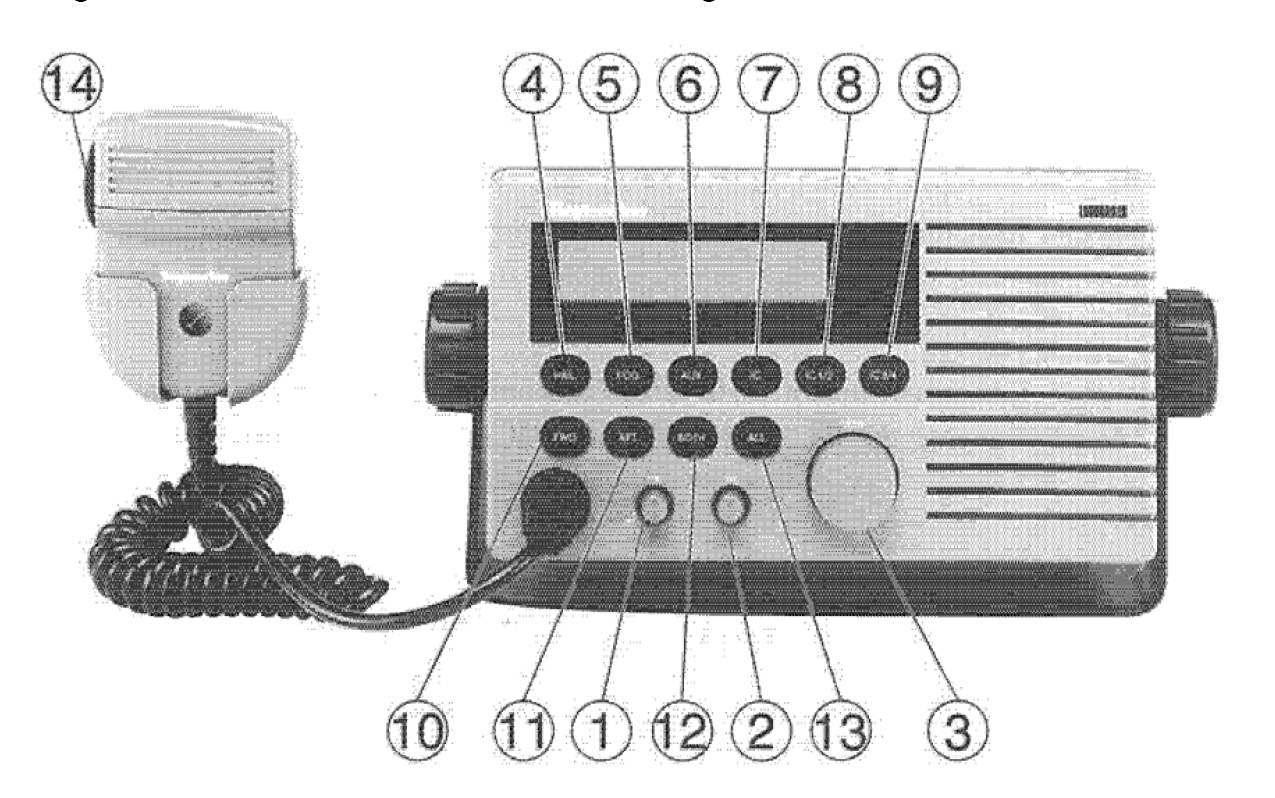 By good fortune, the Raymarine 430 Loudhailer on Cape Lazo can do this for you. On the front of the loudhailer there is a button marked "FOG" (#5 in the illustration, second from the left below the display window). You can press this to sequence through a number of available signals.
The first three presets are MANUAL, UNDRWY, and STOP. Selecting MANUAL allows you full control using the PTT button on the MIC. If you press FOG again you can select UNDRWY and the external speaker will sound one long blast and repeat it every two minutes. If you press FOG again, you will select STOP and the speaker will change to two long blasts every two minutes.
Each time you press FOG you will select a different sound pattern. Other patterns are for sailing vessels, anchored vessels, and so on. After going through all of the options, you will cycle back to MANUAL.